
IT infrastructure modernisation in Australia is the process of upgrading ageing servers, networks, applications and other legacy technology with more secure, reliable and scalable infrastructure. It can include cloud migration, server and network upgrades, cyber security improvements, modern workplace technologies, backup and disaster recovery, and hybrid cloud infrastructure.
For Australian organisations, modernisation is not simply about replacing old technology. The objective is to create an IT environment that improves security, resilience, performance and scalability, while providing a stronger foundation for cloud services, hybrid working, automation and AI.
Modernisation does not necessarily mean moving everything to the cloud. Depending on the organisation, the right approach may combine on-premises, cloud and hybrid infrastructure.
ITConnexion helps Australian organisations assess, modernise and manage their IT infrastructure through a practical, staged approach designed to minimise disruption and maximise the value of technology investments.
Book an IT Infrastructure Consultation →The appropriate modernisation strategy depends on an organisation's existing technology, business requirements, cyber risk, budget and future plans.
IT infrastructure modernisation involves reviewing and upgrading the technology foundation supporting an organisation. Depending on the environment, this may include:
Modernisation should not begin with the assumption that everything needs replacing. A better starting point is to understand what should be retained, upgraded, replaced, consolidated, migrated or retired. ITConnexion's Cloud Feasibility Review and Migration services help organisations assess their current infrastructure, business requirements, cloud readiness, security considerations and appropriate migration strategy.
Australian organisations increasingly depend on digital infrastructure for everyday operations, communication, customer service, data access and business continuity. At the same time, many environments have evolved incrementally over years, resulting in technology that technically still works but is becoming:
Modernisation provides an opportunity to address these issues as part of a coordinated technology strategy rather than continually fixing individual problems. For Australian organisations, cyber security is also central to the conversation — the Australian Signals Directorate's Essential Eight provides mitigation strategies designed to make it harder for cyber threat actors to compromise systems.
Security + Productivity + Resilience + Growth
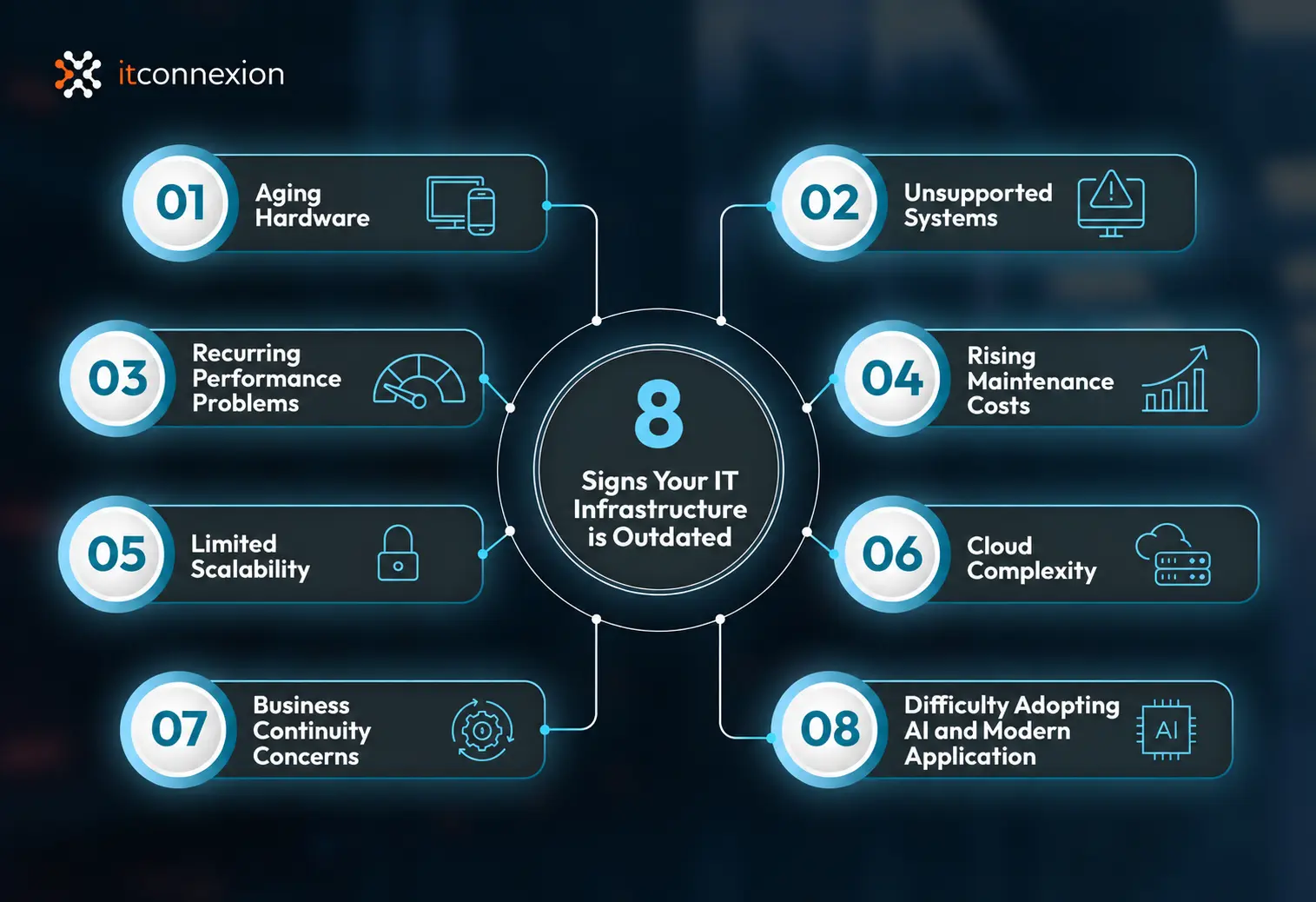
Infrastructure rarely becomes obsolete overnight. The warning signs usually appear gradually.
Servers, switches, firewalls, storage and endpoints approaching end-of-life can become increasingly difficult and expensive to support.
Operating systems and applications outside vendor support may no longer receive important security and reliability updates.
Slow applications, unreliable connectivity, network bottlenecks and repeated IT incidents can affect productivity across the organisation.
Increasing amounts of IT budget may be spent maintaining ageing technology without improving capability.
Infrastructure designed for a smaller organisation may struggle as users, applications, locations and data volumes grow.
Cloud services adopted independently over several years can create duplicated technology, unnecessary expenditure and management complexity.
Legacy backup technology and poorly tested recovery processes can create significant operational risk when something goes wrong.
Modern AI, automation, analytics and cloud applications depend on reliable infrastructure, secure identities, appropriate permissions and well-managed data.
If several of these issues apply to your organisation, replacing individual devices may no longer be enough. It may be time to develop an IT infrastructure modernisation roadmap.
The business case for modernisation should be based on the organisation's actual requirements rather than upgrading technology simply because something newer exists. Successful infrastructure modernisation requires assessment, planning, prioritisation, implementation, testing and ongoing management. For larger or more complex projects, ITConnexion's Consulting & Project Services can support solution design, implementation, migration, quality assurance, project management, training and adoption.
Your underlying technology should support your organisation without becoming a constant source of disruption.
The objective is to create an environment that is stable, manageable and capable of supporting changing organisational requirements. ITConnexion's Managed IT Infrastructure services cover endpoints, servers, cloud infrastructure, virtualisation, storage, networks, wireless infrastructure, VoIP, backup and disaster recovery.
Cloud is an important component of modern IT infrastructure, but moving everything to the cloud is not automatically the right strategy. A better question is: what infrastructure model best supports the organisation?
Appropriate where application requirements, performance, data location, existing investments or operational requirements justify retaining infrastructure locally.
Using cloud platforms to provide flexibility, scalability and access to modern services.
Combining on-premises and cloud technologies to balance performance, security, flexibility and cost.
The objective shouldn't be cloud for the sake of cloud. It should be the right platform for the right workload.
Microsoft's Cloud Adoption Framework recommends assessing workloads individually and choosing an appropriate strategy based on business drivers, technical requirements and operational constraints. ITConnexion provides Cloud Solutions covering cloud feasibility, migration, Microsoft 365, Infrastructure as a Service, backup, disaster recovery and hybrid infrastructure.
Infrastructure and cyber security should no longer be treated as separate technology strategies. Modernising infrastructure creates an opportunity to strengthen security at the foundation.
Modern infrastructure should also be secure infrastructure.
ITConnexion's Managed IT Security services provide protection across endpoints, networks, firewalls, ransomware, access controls, backup and cyber risk.
Every infrastructure modernisation strategy should answer an important question: what happens when something goes wrong? Hardware failure, ransomware, human error, connectivity problems or service disruption should not automatically become a business crisis.
The objective is not simply to back up information. It is to ensure the organisation can recover critical systems and continue operating when disruption occurs.
ITConnexion provides both Backup as a Service and Disaster Recovery as a Service as part of its cloud and infrastructure capabilities.
There is no single modernisation strategy suitable for every workload. Depending on the environment, the appropriate decision may be to retain, refresh, migrate, replatform, replace or retire technology.
Replace ageing or unsupported infrastructure while retaining the overall architecture.
Improve the existing environment while introducing selected modern technologies.
Move appropriate workloads from legacy infrastructure to modern cloud or platform services. This may reduce infrastructure management requirements and provide greater scalability or resilience. ITConnexion's Infrastructure as a Service solutions support private, public and hybrid cloud infrastructure.
Redesign parts of the environment around modern cloud, security, application and digital workplace technologies.
For complex environments, phased implementation can reduce risk by allowing individual components to be migrated and tested before progressing further. Microsoft's cloud modernisation guidance similarly recommends dividing complex modernisation into logical phases, starting where appropriate with manageable, high-value changes and sequencing later phases according to business value and technical dependencies.
Rather than applying a generic industry figure, organisations should first assess their existing environment and determine which technology should be Retained | Upgraded | Replaced | Consolidated | Migrated | Retired. This creates a much stronger basis for budgeting and allows investment to be prioritised according to business impact, cyber risk, urgency and strategic value.
Modernisation does not need to happen all at once. For many organisations, a staged approach can reduce risk, minimise disruption and align investment with business priorities.
Understand the current environment. Review:
Identify:
Not every issue needs to be solved immediately. Prioritise modernisation according to Business Impact + Cyber Risk + Urgency + Cost + Strategic Value. This helps separate infrastructure requiring immediate attention from technology that can safely remain in place.
Develop the future-state architecture. Determine which technology should remain on-premises, move to the cloud, operate in a hybrid model, be replaced or be retired. Microsoft's Cloud Adoption Framework similarly recommends matching the modernisation strategy to each workload rather than assuming one migration approach suits everything.
Implement the roadmap in manageable stages. Where possible:
Modernisation doesn't end when implementation is complete. Infrastructure should continue to be:
AI adoption is accelerating, but organisations often focus on the AI application without considering the infrastructure, security and data environment supporting it. Before introducing Microsoft Copilot, AI agents, automation or other AI platforms, organisations should consider whether they have:
AI readiness starts with IT readiness.
Microsoft's current Cloud Adoption Framework incorporates data platforms, generative AI and AI agents into its broader cloud adoption guidance. Modernising infrastructure today can provide the foundation for technologies the organisation wants to adopt tomorrow.
Since 2003, ITConnexion has helped Australian organisations manage, secure and transform their technology environments. The objective isn't to replace technology simply because something newer is available — it is to understand where the organisation is today, where it needs to go and the most practical way to get there.
Review the existing environment, identify risks and establish priorities for future investment.
Design and implement server, storage, network, wireless and connectivity infrastructure.
Assess which workloads should remain on-premises, move to cloud platforms or operate within a hybrid environment through ITConnexion's Cloud Feasibility Review and Migration services.
Modernise collaboration, productivity and information management through Microsoft 365 and SharePoint.
Strengthen infrastructure through layered security, identity protection, monitoring and cyber risk management.
Protect critical systems and data while improving the organisation's ability to recover from disruption.
Plan technology refresh cycles so infrastructure can be replaced proactively rather than reactively.
Plan, test, migrate and implement infrastructure changes with appropriate project management and change control.
Once infrastructure has been modernised, ITConnexion can provide ongoing monitoring, management, security and support through its Managed IT Services.
One of the biggest concerns organisations have about infrastructure modernisation is disruption — and that concern is justified. Poorly planned infrastructure changes can affect users, applications and business operations. Successful modernisation therefore starts with discovery, planning and sequencing, rather than immediately replacing technology.
You don't necessarily need to replace everything. You need to understand:
IT infrastructure modernisation is the process of upgrading or redesigning ageing servers, networks, endpoints, cloud platforms and other technology to improve security, reliability, performance and scalability.
Common components include server and network upgrades, cloud migration, hybrid infrastructure, cyber security, endpoint modernisation, backup and disaster recovery, infrastructure monitoring and lifecycle management.
Modernisation can reduce the risks associated with ageing and unsupported technology while improving reliability, scalability, cyber security, business continuity and readiness for future applications.
Potential benefits include improved security, better performance, greater reliability, increased scalability, stronger disaster recovery, reduced technical debt and improved readiness for cloud, automation and AI.
Common challenges include legacy application dependencies, migration complexity, integration requirements, cyber security, project cost, business disruption, skills gaps and user adoption.
There is no standard timeframe. The duration depends on the size and complexity of the environment, applications, data, locations, security requirements and scope of the project. Complex modernisation programs are often delivered in phases.
Costs vary considerably depending on infrastructure size, hardware, cloud services, licensing, cyber security, migration requirements and project complexity. An infrastructure assessment should normally be completed before developing a modernisation budget.
No. The right solution may involve cloud, on-premises or hybrid infrastructure. Individual workloads should be assessed according to business, technical, security, performance and cost requirements.
Infrastructure modernisation focuses primarily on improving the technology foundation of an organisation. Digital transformation is broader and can involve changing business processes, customer experiences, products, services and ways of working using digital technology. Infrastructure modernisation can provide the foundation for broader digital transformation.
Common signs include ageing hardware, unsupported software, recurring outages, poor performance, increasing maintenance costs, security vulnerabilities, limited scalability and difficulty supporting modern applications.
Not necessarily. A phased approach can allow the highest-risk or highest-value infrastructure to be addressed first while reducing disruption and spreading investment over time.
Modernisation can remove unsupported technology and provide an opportunity to strengthen patching, identity management, endpoint protection, network security, backups, monitoring and other cyber security controls.
Yes. AI adoption can depend on secure identities, appropriate permissions, well-managed data, modern endpoints, reliable connectivity, cloud integration and appropriate cyber security controls.
Start by documenting the current environment, identifying risks and end-of-life technology, understanding business requirements, prioritising improvements and designing a staged future-state architecture. Each stage should have clear objectives, dependencies and success criteria.
Yes. A managed service provider can assist with infrastructure assessment, strategy, architecture, procurement, cloud migration, cyber security, project delivery and ongoing management. The scope should be based on the organisation's requirements and existing internal capabilities.
You may not need a complete infrastructure transformation. You may simply need a clearer picture of where your technology stands today and what will require attention over the next 12, 24 or 36 months. An IT infrastructure review can help identify:
From there, ITConnexion can help develop a practical infrastructure modernisation roadmap aligned with your operational priorities, risk profile and budget.
Book an IT Infrastructure Consultation →