
AI adoption is no longer something organisations are simply considering for the future.
According to a 2024 report, 75% of global knowledge workers now use AI at work, based on research involving 31,000 people across 31 countries.
AI is already becoming part of the everyday workplace. Employees are using AI to draft emails, summarise meetings, analyse information, create presentations, research topics, write reports and automate everyday tasks. Microsoft 365 Copilot is bringing AI directly into the applications many organisations already use every day.
The conversation is quickly moving from “Should we use AI?” to a much more important question: “Are we ready to use AI properly?”
Because successful AI adoption isn’t just about choosing an AI tool.
It depends on the technology environment underneath it: your data, permissions, identities, cyber security, cloud environment, governance and people.
And in many organisations, AI adoption may be moving faster than those foundations.
How Do You Know If Your Business Is Ready for AI?
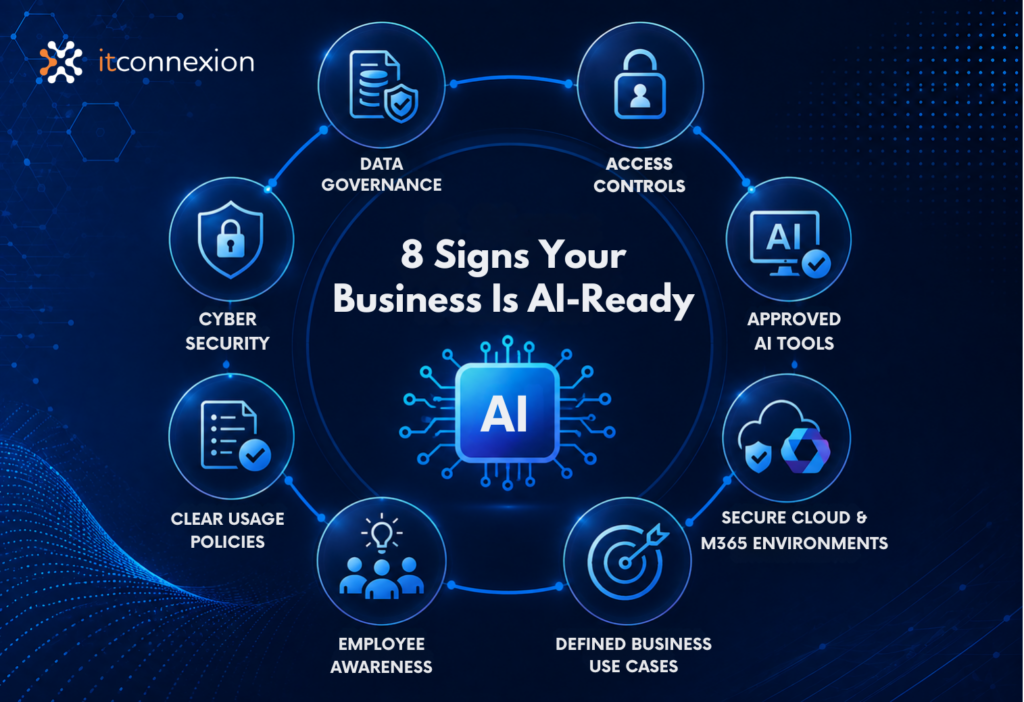
A business is ready for AI when it has appropriate data governance, access controls, cyber security, approved AI tools, clear usage policies, secure cloud and Microsoft 365 environments, employee awareness and defined business use cases. AI readiness is not just about technology; it requires the right security, governance, data and people foundations.
So before rolling out more AI tools, here are six questions worth asking.
1. Do You Actually Know Which AI Tools Your People Are Using?
This is a surprisingly good place to start.
Your organisation may not have formally adopted AI, but that doesn’t mean your employees aren’t already using it. According to a 2024 report, 75% of global knowledge workers now use AI at work.
Someone may be using ChatGPT to improve an email.
Another person may be using an AI meeting assistant.
Someone else may be uploading a spreadsheet to an AI tool to analyse the numbers.
A marketing employee may be using AI to generate content, while another employee has connected an AI application to a business platform.
This creates what is increasingly referred to as shadow AI: AI tools being used within an organisation without formal approval, visibility or governance.
The objective shouldn’t necessarily be to ban AI.
In many cases, that simply drives its use further underground.
A better starting point is visibility.
What AI tools are being used? Who is using them? What business information are they accessing? And which tools has the organisation actually approved?
You can’t effectively govern what you don’t know exists.
2. Do You Know What Business Information Is Being Shared With AI?
This is where AI becomes a data governance issue.
Consider the information employees work with every day:
- customer information
- contracts
- financial data
- employee records
- internal reports
- intellectual property
- project information
- business strategies
- credentials and technical information
Now consider how easily some of that information can be copied into an AI prompt.
The question isn’t simply whether an AI platform is secure.
You also need to understand what information employees are allowed to provide to it, how that information is handled and whether the organisation has appropriate policies and controls in place.
The Australian Signals Directorate’s Australian Cyber Security Centre has specifically highlighted risks associated with business AI adoption, including data leakage, privacy breaches and AI supply-chain vulnerabilities.
AI governance therefore shouldn’t begin with:
“Which AI product should we buy?”
It should begin with:
“What information do we have, who should have access to it, and what are we comfortable allowing AI to access?”
3. Is Your Microsoft 365 Environment Ready for Copilot?
This is an especially important question for organisations already using Microsoft 365.
Microsoft 365 Copilot can work across familiar applications and organisational information to help users find, summarise and create content.
That can be enormously useful.
But it also makes something else increasingly important:
Your existing Microsoft 365 permissions need to make sense.
Think about your SharePoint sites, Teams, OneDrive folders and shared documents.
Over many years, organisations can accumulate:
- old SharePoint sites
- broadly shared folders
- outdated security groups
- former project teams
- unnecessary permissions
- duplicated information
- documents accessible to more people than intended
Before AI, some of those problems could remain largely unnoticed because employees needed to know where information was stored and actively search for it.
AI changes the way people discover information.
This is why preparing for Microsoft 365 Copilot shouldn’t be treated simply as a licensing exercise.
It is also an opportunity to review Microsoft 365 security, permissions, information governance and data hygiene.
Before asking:
“How many Copilot licences should we buy?”
it may be worth asking:
“Is our Microsoft 365 environment ready for Copilot?”
4. Are Your Cyber Security Foundations Ready for AI?
AI creates new opportunities for organisations.
Unfortunately, it creates opportunities for attackers too.
AI can help cybercriminals operate faster, improve phishing and social engineering, analyse potential vulnerabilities and scale attacks more efficiently.
That doesn’t mean organisations should fear AI.
It means the fundamentals of cyber security become even more important.
Strong identity management, multi-factor authentication, patching, endpoint protection, least-privilege access, monitoring, tested backups and incident response remain critical.
For Australian organisations, frameworks such as the Essential Eight continue to provide an important foundation for improving cyber resilience.
AI doesn’t replace these fundamentals.
It increases the importance of getting them right.
The Australian Signals Directorate has also recently warned that AI is changing the speed and scale of cyber threats and has released specific guidance for Australian organisations on defending against AI-enabled attacks.
That makes AI readiness a cyber security conversation as much as a productivity conversation.
5. Are You Investing in AI Because It's Useful, or Because It's AI?
AI is attracting enormous attention, and that creates another risk: investing in technology before identifying the problem it is supposed to solve.
Buying licences isn’t an AI strategy.
A better starting point is to identify specific business problems.
For example:
Could AI reduce the time employees spend preparing routine reports?
Could it summarise meetings and identify actions?
Could it help employees find information buried across Microsoft 365?
Could it improve customer service?
Could it assist with data analysis?
Could it reduce repetitive administrative work?
Then measure what happens.
Are employees actually using the technology?
Is it saving time?
Is the quality acceptable?
Are there measurable productivity improvements?
Are there unexpected risks?
Are you paying for licences that aren’t being used?
Australia is already one of Microsoft’s leading markets for Microsoft 365 Copilot adoption, so for many organisations the next phase isn’t simply adoption. It is demonstrating value.
AI should solve a business problem.
“Everyone else is using it” isn’t a business case.
6. Do You Have an AI Roadmap, or Just AI Tools?
This may be the most important question of all.
Many organisations will gradually accumulate AI capabilities.
Microsoft 365 may introduce more Copilot functionality.
Business applications may add embedded AI.
Employees may subscribe to specialist AI services.
Departments may independently experiment with automation.
Before long, an organisation can have plenty of AI but very little AI strategy.
A simple AI roadmap doesn’t need to be complicated.
At a high level, it should provide direction across four key areas:
- Business value: Which AI use cases should we prioritise, and how will we measure their value?
- Governance & security: Which AI platforms are approved, what information can be used with AI, and what security controls are required?
- People & adoption: How will employees be trained, supported and encouraged to use AI responsibly?
- Technology & future planning: How will we manage new AI applications and ensure AI aligns with our broader technology roadmap?
The objective isn’t to predict everything AI will do over the next five years.
Nobody can do that reliably.
The objective is to create enough structure for your organisation to adopt AI confidently, capture its value and maintain visibility and control as the technology evolves.
AI Readiness Is Really IT Readiness
Perhaps the most important point is this:
Preparing for AI isn’t only an AI project.
It’s a data project.
It’s a cyber security project.
It’s an identity and access project.
It’s a Microsoft 365 project.
It’s a governance project.
It’s a people project.
And ultimately, it’s part of your broader technology strategy.
Organisations with well-managed technology environments will generally be in a much stronger position to adopt AI safely and extract value from it.
Those with years of accumulated permissions, ageing infrastructure, unmanaged applications, inconsistent security controls and fragmented data may find that AI exposes problems that were already there.
So before asking:
“Which AI tool should we implement next?”
consider asking:
“Is the technology environment underneath our AI ready for what’s coming next?”
Six Questions to Take Back to Your Team
If AI is already being used in your organisation, start with these six questions:
- Do we know which AI tools our employees are using?
- Do we know what company information is being shared with those tools?
- Are our Microsoft 365 data and permissions ready for Copilot?
- Are our cyber security controls keeping pace with AI-related risks?
- Can we demonstrate value from the AI tools we’re paying for?
- Do we have an AI roadmap and governance framework?
If you can’t confidently answer all six, that doesn’t mean your organisation isn’t ready to use AI.
It means you’ve identified where the next conversation needs to begin.
Where Does Your Organisation Stand?
AI is moving quickly, but adopting it well doesn’t mean adopting everything immediately.
It means understanding your environment, identifying valuable use cases, putting the right safeguards in place and building from strong technology foundations.
At ITConnexion, we’re already having these conversations with organisations around Microsoft 365, cyber security, cloud, infrastructure and technology strategy.
If you’re unsure whether your current environment is ready for the next stage of AI, talk to us.
Start with an AI & Technology Readiness conversation with ITConnexion.
And next month, we’ll continue our Is Your Technology Ready for What’s Next? series with:
September: Is Your IT Infrastructure Ready for the Next 3 Years?
We’ll look at the signs that infrastructure, networks, cloud environments and hardware may be reaching the point where maintaining the status quo is costing more than modernising.